Unreal Engine: Advanced Widgets for UI
Course Description
Learn advanced UI techniques that will help you build complex menu systems like Skyrim, Final Fantasy, and Call of Duty!
You already know how to create UI, now learn how to master it!
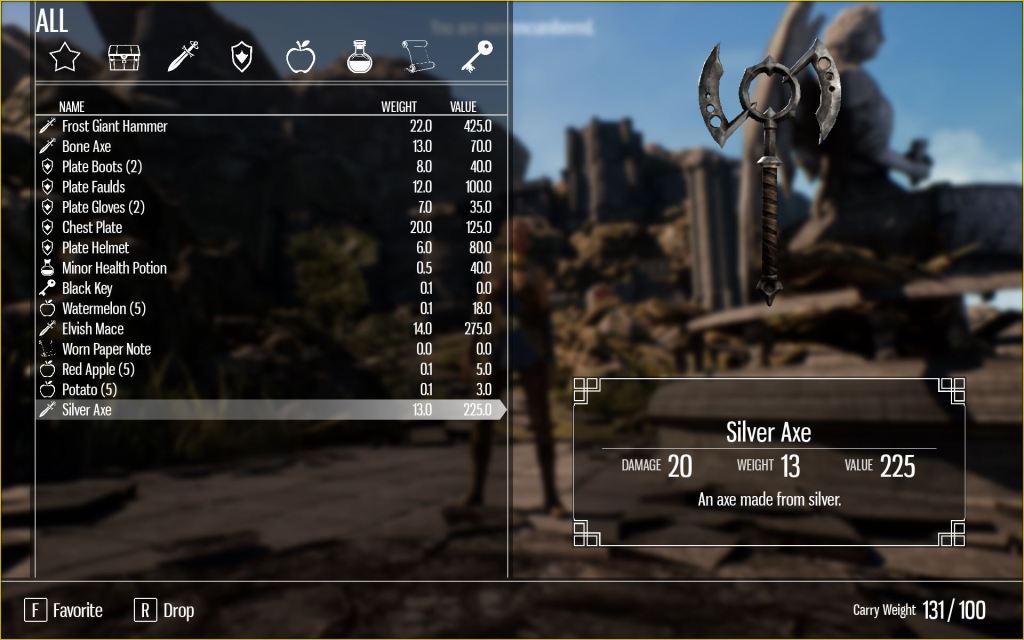
In this course, you will learn advanced techniques to use the Unreal Widget Blueprint system to create UI (User Interface) for your games and applications. These are the same user interfaces that you see in popular games such as Skyrim, Madden NFL, Hogwarts Legacy, and Final Fantasy! These menus also mimic the menus that I use to create visualization applications at a Fortune 500 company, and are proven techniques! It is vitally important for any Unreal developer to understand how to create more advanced menu systems using the widget blueprint system. By the end of this course, you will have the knowledge and expertise to be able to create complex, data driven menus, utilize advanced rendering techniques, and create virtually any kind of menu within your own games and applications! You will also have developed an advanced dynamic inventory system inspired by The Elder Scrolls Skyrim!
This course is a an advanced course for those who already know the basics of the Unreal Widget Blueprint system. It is targeted at Unreal Engine users who have at least a basic understanding of widgets, though you will be able to follow along no matter what level you are currently. We will not be going over how to download and install the Engine or general navigation of the Editor, nor will we be going over how to create or display a widget. However, you will master how to design and program advanced widgets within the Widget Blueprint Editor! NO PROGRAMMING KNOWLEDGE REQUIRED!
What You Will Learn
- How to create data driven dynamic menu systems
- Utilizing data tables and structs to create dynamic menus
- Advanced widget rendering techniques
- Custom widget interaction
- 3D widget creation and interaction
- How to map a game controller to use your widgets
- Using a render target to render a secondary camera to a widget
- Using a render target to render a secondary camera to a widget
- How to create drag and drop widgets
- How to create a Skyrim inspired inventory system
- And much more!
Requirements/Prerequisites
- Recommended: Basic computer knowledge
- Recommended: An understanding of basic navigation for the Unreal Engine
- Recommended: A basic understanding of how to create and display widgets
- Recommended: A basic understanding of widget designer mode and graph editor mode
- Recommended: Unreal Engine 5.1 or higher installed
- Recommended: Visual Studio 2019 Community or higher installed (If you want to follow along with the short programming section)
- Recommended: Desktop PC with Windows 7 (or later) 64-bit – OR – a Mac with Mac OS X 10.9.2 or later
- Recommended: DirectX 11 compatible video card
- Recommended: Quad-core Intel or AMD processor
- Recommended: 8 GB RAM
- NO programming experience needed!
Intended Audience
- Students who want to learn how to create UI for games and applications
- Students interested in learning advanced widget concepts in Unreal Engine
- Students interested in creating complex inventory systems
- Students interested in creating an Action RPG
Length
7 hours 48 minutes
Curriculum
- Introduction
- Project Primer
- Making the Most Out of this Course
- Data Driven Dynamic Widgets
- Object-Oriented Programming
- User Created Widgets
- Creating Dynamic Menus
- Data Tables & Structs
- Importing Data at Runtime
- Parsing Data at Runtime
- Asset Registry
- Data Driven Widget System
- Custom Widget Interaction
- Overriding Events and Functions
- Drag & Drop
- Preconstruct Event
- Controller Mapping
- Binding External Events
- Editor Widgets
- Advanced Widget Rendering
- Responsive AI
- 3D Widgets
- UI Materials
- Render Target Texture
- Retainer Box
- Widget Alpha Mask
- Advanced UI Animation
- Inventory System
- Introduction and Set Up
- Item System
- Creating the 3D Pickup Widget
- Creating the Inventory Item and Inventory Widgets
- Creating the Stat Widgets
- Creating the Inventory Type Widgets
- Creating the Overencumbered Widget
- Setting Up the Inventory Menu Functions and Variables
- Character: Input Mapping
- Character: Initializing Widgets and Getting the Closest Item
- Character: Finishing the Character
- Inventory Design: Inventory Section
- Inventory Design: Description Section
- Inventory Design: Bottom Section
- Inventory Functionality: Keyboard or Gamepad Function
- Inventory Functionality: Add Item
- Inventory Functionality: Populate Inventory
- Inventory Functionality: Update Weight
- Inventory Functionality: Set Favorite
- Inventory Functionality: Drop Item
- Inventory Functionality: Click Inventory Item Button
- Inventory Functionality: Change Inventory Type
- Inventory Functionality: Open Inventory Function
- Inventory Functionality: Finishing the Main Inventory
- 3D Item
- Debugging
- Populating the World
Video Previews
In this project primer, we will walk through what this course will be about.
In this video, I will go over what object-oriented programming is, and how it relates to the Unreal Engine and widgets.
Learn how to override events and functions in the Unreal Widget Editor and why it is important to do so.
What is a responsive menu and why is it important?
The introduction and set up of an Elder Scrolls Skyrim inspired inventory system.
The conclusion of my Elder Scrolls Skyrim inspired inventory system.
 Robot Brain Academy